


Key Takeaways: Conference phones provide professional audio on group calls. Video conferencing systems have replaced conference phones in many cases, but conference phones still have a place in business communications today.

The conference phone is an essential device in the traditional meeting room.
An omni-directional microphone array and powerful speaker tuned for phone calls? Sounds pretty good.
But in recent years video conferencing has grown so popular that it has replaced purely audio calls for many companies.
So the question is: do you still need a conference phone today?
The title of the blog gives away the answer: it depends.
There are many common business scenarios in which conference phones are still an excellent tool for professional-grade communication. But there are also many scenarios where you no longer need a conference phone.
In this blog, we explore where conference phones fit in with business communications in 2026.
Let’s get into it!
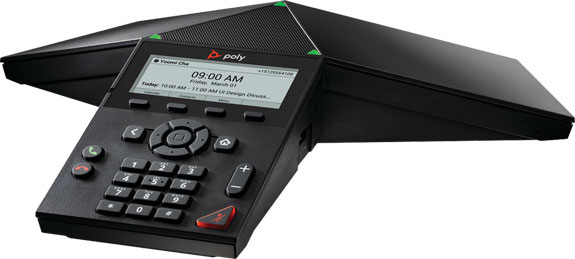
Conference Phones for Business Today
Conference phones are purpose-built solutions for group audio calls.
They use microphone arrays to capture voices in all directions. They use intelligent, algorithmic methods to clarify the audio stream, both sending and receiving. They also have powerful speakers and a screen or keypad to manage calls.
They’re particularly good at large groups and large spaces, much better than speakerphones. It’s what they’re built for.
And they’re really, really good at doing what they do — so good, in fact, that there haven’t been any ground-breaking conference phone innovations in the past handful of years. That’s led to a slowdown in the number of new conference phones released. Which is no bad thing: conference phones last a long, long time (in tech terms).
Conference phones are facing competition as times have changed.
Business communication ecosystems now tend to combine multiple applications. Telephony, video conferencing, content sharing, and so on are on one platform — unified communications (UC).
Of the common UC applications, video conferencing requires the most equipment. Group audio calls only need a conference phone, but group video calls need (at least) a camera and a display on top of any audio devices.
It makes business sense to plan for the most complicated application and then fit everything else around it.
So conference rooms have now become video conferencing rooms.
The primary competition for conference phones is video conferencing systems.
These systems always include a microphone, speaker, and control device — the three primary functions of a conference phone.
You can use a video conferencing system as an audio conferencing system in most cases. Just don’t use the camera and display.
Where does that leave the trusty conference phone?
There are two places where conference phones still shine:
- Holding Audio Calls Instead of Video Calls
- Using a Conference Phone for Video Conferencing
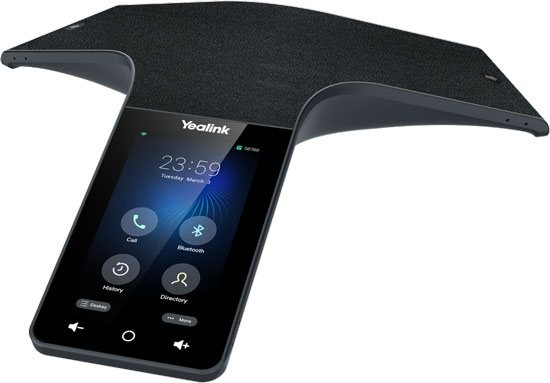
Audio Calls Are Still a Good Thing
We’re as guilty as anyone in singing the praises of video conferencing. But audio-only group calls still have an important place in business today.
And you still can’t beat a conference phone for professional audio quality on a group audio call.
What are the advantages of group audio calls?
- Efficient
- Less formal and more natural
- Familiar
- Less expensive
Audio calls are often more efficient than video calls.
You’re not worrying about making sure the camera is angled correctly and everyone being seated in the right position and the display being hooked up correctly.
Just dial the phone number and start talking.
Audio calls are less formal than video calls, so they can let people act more natural than video calls.
On a video call, you’re always worrying about eye-lines and posture and how you look on camera. For example, writing notes can look rude, because you’re looking at a pad of paper or a laptop instead of the camera. You’re not being rude — you just look like it.
On an audio call, however, you can take your notes without worrying about how you look while you take notes. Notes are a good thing. Looking up accurate information is a good thing. You’re being yourself.
And being yourself is a good thing — as long as you’re still following professional etiquette, of course.
You don’t need to worry about what’s in the background of the call, too.
Audio calls are, for many people, more familiar.
It might be more comfortable for many workers, especially older workers, to not worry about getting every video device to work optimally and to set up and manage video meetings.
Audio calls can be less expensive than video calls.
They require less infrastructure and you don’t need to pay for video call licensing. If you don’t use group video conferencing that often, going with just a conference phone is a real possibility.
So audio group calls still have a place in the contemporary work environment.
Of course, there’s nothing forcing you to use a conference phone for audio calls instead of video conferencing or other equipment.
But conference phones deliver professional audio quality via a simple, familiar interface — every time.
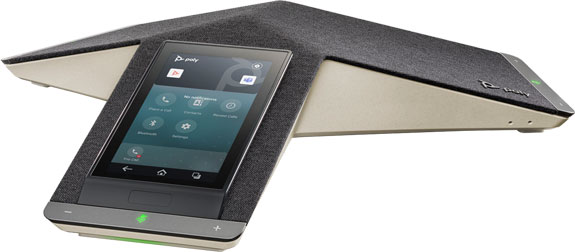
Conference Phones Can (Sometimes) Be Used for Video Conferencing
Why not just use a conference phone as the microphone, speaker, and control device for your video conferencing system? Or at least the microphone and speaker? Can you use existing a conference phone with a new platform?
You can sometimes use a conference phone for video conferencing. This gets a tricky. It’s a compatibility issue — compatibility with both systems and other devices.
Here are two specific examples that illustrate the situation (information current as of March 2026):
- Poly Trio C60
- Yealink CP965
The Poly Trio C60 Conference Phone is compatible with the Poly Studio X72 Video Bar. Studio X72 is intended for use in large conference rooms. In this arrangement, Trio C60 acts as a premium speakerphone for the video bar, giving you professional-grade audio for large groups.
Studio X72 is compatible with numerous video conferencing platforms, including Microsoft Teams. When using the video bar with Microsoft Teams, you can use a Trio C60 as a speakerphone, but it can’t act as a controller for the system. You need a separate device like a touch console for control.
The Yealink CP965 Conference Phone is amazing for audio calls, but unfortunately it isn’t compatible with current Yealink MeetingBars or Yealink MVC Series Systems. It can’t act as an audio device for these video bars and video conferencing systems.
If you want to use a conference phone for video conferencing, you need to triple check compatibility.
When the conference phone is compatible, however, it’ll give you exceptional audio quality on group calls.
And that means the conference phone can still have a vital place in the meeting room in 2026.