


When you picture a VoIP phone, you probably picture a desk phone on an office desk that’s placed next to a computer.
But, a lot of the time, mounting the VoIP phone on a wall is much more convenient.
Wall mounting VoIP phones is very common. There are many scenarios in which wall mounting a phone makes perfect sense.
These scenarios generally fall into one of two categories: 1) public usage and 2) usage by multiple workers who will be moving around the workspace.
Examples of public wall mounted VoIP phones include:
- Common area phones and lobby phones
- Kiosk phones and information desk phones
- VoIP phones used as intercoms (we cover this topic in more detail below)
Examples of wall mounted VoIP phones for workers who aren’t seated at desks include:
- Hospital phones and healthcare phones
- School phones
- Box store phones and supermarket phones
- Warehouse phones and logistics phones
In this blog, we provide a clear FAQ about wall mounting VoIP phones.
Let’s get into it!
Questions About Wall Mounting VoIP Phones
Let’s start with some basic questions:
Are all VoIP phones wall mountable?
No, not all VoIP phones are wall mountable. However, we think it’s safe to say that most of them are.
How do I know if my VoIP phone is wall mountable?
This can actually be a bit difficult. The product description, datasheet, user guide, quick start guide, or installation guide will tell you.
You often have to look under product contents where a wall mount will be listed as an optional accessory. (Most phones don’t come with wall mounts.)
Good news! You can also find the answer on our website. Look under the Specifications tab on a product description page.
If all else fails, get in touch! Our experts are here to help you find the right wall mount for your phone.
Sidenote: in our experience, it’s best not to rely on AI search engines for information like this. They still frequently get specifics wrong like whether a phone is wall mountable or not.
What do I use to wall mount a VoIP phone?
You use a wall mount, which might be called a wall mount bracket or come in a wall mount kit. Some phones come with a multi-purpose stand that functions both as a regular desk stand and as a wall mount.
Wall mounts are compatible with specific models. A given Poly wall mount might not work with the Poly phone you want to wall mount. Always doublecheck compatibility before purchase.
What wall mount is compatible with my VoIP phone?
Most wall mountable VoIP phones don’t come with a wall mount. The wall mount must be purchased separately.
Often can be difficult to find the specific wall mount that’s compatible with a specific VoIP phone.
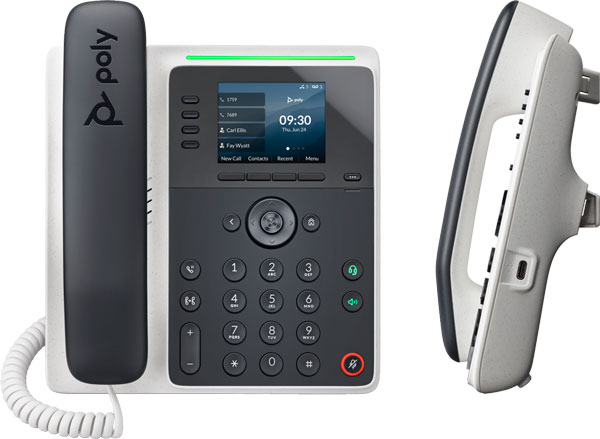
Try to find the specific SKU you need and search using that SKU. For example, Poly Edge E220 uses a wall mount bracket that’s listed as Poly 8F3R7AA.
Some phone manufacturers like Cisco will list the required SKU in the phone’s datasheet, but often they don’t. Some phone manufacturers like Fanvil list compatibility in the wall mount’s information but not in the phone’s. Even more confusing, sometimes the SKU for a wall mount is named for one phone even though it’s compatible with more than that phone; for example, Yealink Mount-SIP-T42G is compatible with many more phones than just Yealink T42G.
Unfortunately, our advice boils down to use your search engine.
If you use AI for search, doublecheck that it’s giving you an accurate result before purchase. In our experience, AI search engines still frequently provide inaccurate information when it comes to specifics like compatibility.
Can I use a third-party wall mount for my VoIP phone?
We strongly recommend using the wall mount made by the manufacturer for your specific model of VoIP phone. It is guaranteed to fit and will provide professional durability. Wall phones are put under more stress than desk phones, so you want the best mount you can get.
What type of VoIP phone is best for wall mounting?
The best type of VoIP phone for wall mounting is one of two types:
- Ultra-simple. A basic VoIP phone with only one or two keys that you preset to speed dial an extension or two. If the phone is wall mounted for public use, you likely want an ultra-simple phone. For example, a phone used in a common area to contact support staff should be usable by everyone.
- Lots of speed dial keys. A VoIP phone with numerous physical line keys that enable workers or other people in-the-know like teachers to dial appropriate extensions. For example, a wall mounted phone in a hospital might have extensions for many different wards so nurses can contact the correct extension as quickly as possible.
In terms of the phone’s physical characteristics, prioritize robust build-quality over fanciness. You’re not looking for a thoroughbred here: you want a sturdy, reliable draft horse of a phone.
Get a phone with physical buttons, not a touchscreen, because you don’t want people to have to navigate at all. It should be clear to anyone what they need to do.
Some phones, like Poly Edge E220, have integrated Microban anti-microbial technology, which improves hygiene.
The next two questions cover two other considerations: network connectivity and power.
How do I connect a wall mounted VoIP phone to the network?
VoIP phones connect to the network in two ways: Ethernet cable or Wi-Fi.
Which one you use is entirely up to which method suits your specific case better, though we always recommend Ethernet connectivity if possible. It’s more stable and reliable. For real-time communication applications like phone calls, having a stable, reliable network signal is vital.
Wi-Fi is, however, often more convenient. If running Ethernet cable is inconvenient, get a phone that supports Wi-Fi. Make sure the Wi-Fi signal is strong and stable enough.
Some phones have native Wi-Fi support, while other phones require a USB dongle to enable Wi-Fi. If the phone is mounted in a public location, we strongly recommend you get a phone with native Wi-Fi support, in case of theft.
How do I power a wall mounted VoIP phone?
VoIP phones are powered in two ways: PoE or external power supply.
PoE (Power Over Ethernet) means that power is delivered to the phone through the Ethernet cable that connects it to the network. You need to use a PoE switch, PoE midspan, or PoE injector.
External power supplies are exactly what they sound like. You should know, however, that most VoIP phones don’t come with a power supply. Because VoIP phones are very often powered by PoE, it saves money for you and the manufacturer not to include it. You’ll probably need to buy the power supply separately.
Besides potentially adding cost, the other drawback to power supplies is cable length. Ethernet cables can be run for much longer distances than a power supply’s cable.
Wall mounted VoIP phones can be powered using either method. Which you use is up to what power source is most convenient and what devices you have.
Can I use a wall mounted VoIP phone as an intercom?
Yes, wall mounted VoIP phones can function as intercoms. You’ll want an ultra-simple VoIP phone with only one or two buttons that are clearly labelled.
That said, they do have certain limitations in comparison with dedicated intercoms.
- They’re not built for outdoor installation. In fact, they’re not as robust generally.
- No matter how simple you make a VoIP phone to use, it’ll never be as simple to use as an intercom with one big button.
- If you want video to see who’s at the doorway, you should use a video intercom, not a video phone.
All that said, using a VoIP phone as an intercom can work just fine. For example, you might use a wall mounted VoIP phone outside a room in a hospital to contact staff inside to let you in.
One advantage to using a VoIP phone is privacy. Because the user typically uses the phone’s handset, people nearby won’t hear the other line.
Can I use a wall mounted VoIP phone as a public emergency phone?
While you could use a wall mounted VoIP phone as an emergency phone, we recommend you use a dedicated emergency phone, which is a type of intercom:
Some VoIP phones do have features for emergency situations.
For example, Poly recently released the Silent Distress Calling feature for Poly Open SIP phones. This feature silently calls a preset emergency number, providing them with necessary information and letting them hear what’s happening, even if you can’t speak to them.
It’s worthwhile to configure an emergency feature like Silent Distress Calling for phones in schools and similar locations.
However, to prevent pranks and other false calls, this feature should only be known to certain people like teachers, so it’s not a replacement for a dedicated emergency phone, which are devices to be used by everyone.
Any more advice for wall mounting a VoIP phone?
The phone and/or the wall mount will come with installation instructions, often in a quick start guide or quick installation guide. Follow those.
Here are a few tips for wall mounting your VoIP phone:
- Make sure you mount it at a convenient height. We’re looking at you, tall people. Be considerate!
- Make sure you install it securely, which might mean installing it on a stud. You don’t want someone who happens to grab the phone ripping it out of the wall.
- When wall mounting a phone, you often need to reverse the hookswitch tab to make sure the handset doesn’t fall off. Check the installation guide. (The hookswitch tab is the little thing that gets pressed in when you put the handset down.)
Our last piece of advice is a bit long for a bullet point. It has to do with Ethernet ports.
VoIP phones almost always have two Ethernet ports to enable network pass-through. That means you connect your phone to the network using an Ethernet cable, then run a short cable from the phone to your computer. Both phone and computer connect to the network without needing two full cable runs.
The problem is wall mounted VoIP phones usually don’t have a second device connected to them.
You need to disable the second Ethernet port, which might be called the WAN port, because it could leave your network insecure.
Secondary ports are disabled in the phone’s user interface. Definitely do this, especially if the phone is in a public location!
Have any more questions? Get in touch! Our friendly experts are waiting to help you.