

Accessibility makes life better for everyone.
That’s why VoIP phone manufacturers are increasingly emphasizing making their devices more accessible.
From hardware choices to software options, accessibility features for VoIP phones are extensive and highly useful.
What kind of accessibility features do VoIP phones support? How do you turn on accessibility features on a VoIP phone?
In this blog, we clearly explain a wide range of VoIP phone accessibility features and give you pointers on how to find and configure them.
Let’s get into it!
How to Make VoIP Phones More Accessible
We’re going to break down the VoIP phone accessibility features into two categories: hardware and software. How are phones physically designed to improve usability by everyone? What settings are available to make the phone using experience more accessible?
You can also use these lists of features when looking for VoIP phones to buy, because not every phone supports every accessibility feature. If you’re looking for a specific accessibility feature to deal with a specific issue — like large text or higher contrast — you’ll know what to look for.
Let’s start with hardware.
Hardware Features for VoIP Phone to Improve Accessibility
Accessible hardware features refer to how a phone is designed physically to make it easier to use.
Here’s a clear list of design choices that phone manufacturers make to improve accessibility.
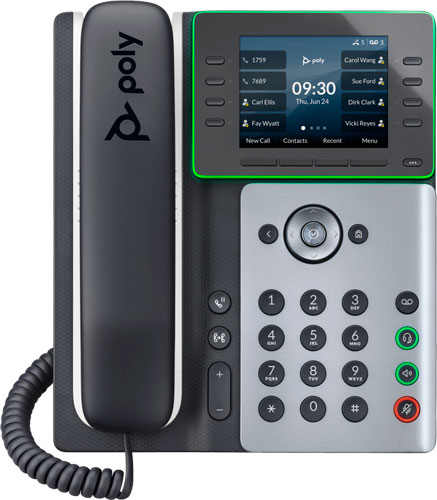
- Large buttons. Having larger, more widely spaced buttons makes a phone easier to use.
- Button-identifying bumps. Having a bump on a button (usually the 5 button) orients the user without relying on sight.
- Button shape. Having buttons with different shapes makes them easier to identify and use.
- Backlit buttons. Backlighting makes buttons easier to see, particularly in low light.
- Physical line keys. As drivers know, software-based buttons are more difficult to use for many, if not most, people. Physical line keys make it easier to use the phone.
- Hearing aid compatible (HAC) handset. Having a handset that is hearing aid compatible greatly helps hearing-challenged users. Thankfully, most phones come with HAC handsets now.
- Adjustable phone stand and/or tilting display. Being able to adjust the display to deal with glare and produce a better viewing angle to make the display easier to read.
- Speakerphone. Speakerphones let a user operate a phone without holding a handset or putting on a headset.
- Inline amplifier support. Inline amps connect to a phone’s handset cord. They let the user control the volume of a call in the handset, making it louder than a phone is natively capable of.
- Loud ringer support. Loud ringers amplify the volume of a phone’s ringer, which makes it easier to hear. These are particularly useful for phones used by the group, rather than just an individual at a desk.
- Strobe and/or busylight support. Strobes can be used as visual indicators of calls, which can help hearing-challenged users know when a call is coming in. Busylights are intended to indicate call status visually to let coworkers know when a user is on a call, but they can also function in the same way as a strobe, letting a user know when a call is coming in.
While there are many hardware-based accessibility features for VoIP phones, there are even more software-based accessibility features for VoIP phones.
Let’s take a look at them now.
Software Features for VoIP Phone to Improve Accessibility
Accessible software features refer to settings in the software (or firmware) user interface of a phone that can be customized to make it easier to use.
One important difference between hardware and software features is that software features can be added and improved over time, which means your phone investment can get better after purchase. (That said, we recommend you never bank on a future software update, because plans can always change; a roadmap is never set in stone.)
Here’s a clear list of VoIP phone software features that can improve accessibility:
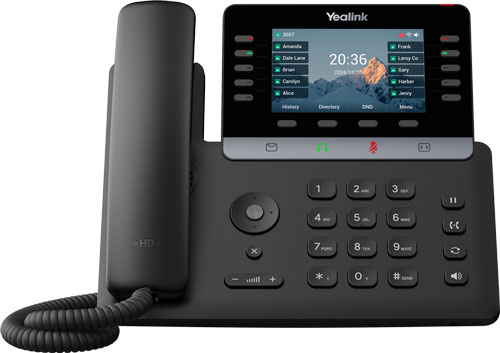
- Transparency levels. Reducing transparency behind text can make text easier to read. This is the same idea as adjusting transparency behind subtitles on a TV.
- Text size. Making text larger makes it easier to read.
- Color filter/correction. Having a user interface that can compensate for color blindness can be the difference between having a usable phone and not. Many phones now support color correction for protanomaly (reduced sensitivity to red light), deuteranomaly (reduced sensitivity to green light), and tritanomaly (reduced sensitivity to blue light) color blindness. It might be called a color filter or color correction.
- Contrast levels. Increasing contrast between screen elements and the background can make text and buttons easier to read and use.
- Backlight intensity. Making a phone’s screen brighter can help see it better. Alternately, if the user is light sensitive, making it dimmer can make it more acceptable to use.
- Screen reader or text-to-speech. Having the phone provide audio descriptions of user interactions helps reduce the emphasis on vision-based interactions. This feature works in a couple ways. It might have the phone state what key the user has pressed, then they press the key a second time to use it. It also might read out information about an incoming call.
- Noise cancellation. While not typically thought of as an accessibility feature, noise cancellation that gets rid of distracting noises can greatly help hearing-challenged users understand conversations. VoIP phones employ many different noise cancellation technologies.
- Auto answering. Being able to set the phone to automatically answer incoming calls can help mobility-challenged users. The calls will be answered using the speakerphone.
- Customizable ringtones. Setting different ringtones for incoming calls can help the user readily identify who’s calling.
- Text messaging. Yes, VoIP phones can support text messages (if it’s supported by the service provider). For voice-challenged individuals, text messaging can be necessary.
- Real-time text (RTT). Real-time text applies to text messages. It means a text message is transmitted as it is typed without the user needing press send. It makes text-based conversations flow more naturally.
As you can see, there are many ways that VoIP phone manufacturers are making their devices ever more accessible for a wide range of users.
Accessibility is good for everyone!