


Video conferencing isn’t just for meeting rooms and home office workers using AirPods. (They should be using office headsets, anyways.)
Construction sites are prime locations for video conferencing.
We’re not talking residential construction here.
We’re talking skyscrapers, we’re talking highway interchanges, we’re talking the long-term projects with full-size trailers.
We’re also not talking about using smartphones for video conferencing.
We’re talking professional video conferencing systems for commercial construction sites.
Project managers need to monitor progress while being able to contact home office at any moment. Superintendents need to be at one site for the day while being able to touch base with a super at another site to coordinate work schedules. The foreman needs to get approval for a change order so the day’s work can progress.
In all these scenarios — and many more — a quick video call is simple, efficient solution for construction worksite communication.
Pro-grade video conferencing systems for mobile office trailers have to balance a number of features.
In this blog, we go through the devices and features to look for when shopping for video conferencing equipment for construction jobsites. We also discuss adding in-person collaboration to the video conferencing system using an interactive whiteboard.
Let’s get into it!
Table of Contents
- Two Questions About Jobsite Video Conferencing Spaces
- Jobsite Video Conferencing Systems Must Be Simple
- Interactive Whiteboards for Construction Jobsites
- Remote Management Platforms for Construction Jobsites
Pro-Grade Video Conferencing for Construction Jobsites
Construction jobsites are like little cities in their complexity and organization. The video conferencing system should be set up in City Hall: the main trailer.
Let’s start there.
Two Questions About Jobsite Video Conferencing Spaces
The first thing you need to do for construction mobile office trailer video conferencing is get a good internet connection. A video call is a bandwidth intensive, real-time application, so solid network connectivity is key.
Got the internet? Good. Let’s move on.
The first question to answer when shopping for a construction jobsite trailer video conferencing system is this:
What is the size of the video conferencing space?
Worksite trailers are highly variable in terms of size and usage.
They vary in size from cramped single-wide trailers to roomy double-wide trailers to office trailers with multiple individual rooms, sometimes including a dedicated meeting room space.
Most workers will be out on-site and not in the trailer, so the trailer might be composed of multiple impromptu spaces that are not exactly spacious. But you still want professional performance.
In this case, look for a video conferencing solution for focus rooms, huddle rooms, or small rooms. Search for these terms.
And search for a huddle room video bar with a wide-angle lens. The wide-angle lens lets the video bar “see” everyone in the group, even if people are sitting close to the video bar. Having too narrow of a field of view means people sitting on the edges of the group might be cut off.
Trailers can also be large with a dedicated space for group video calls. The whole team can easily coordinate with home office, with engineers, with architects.
In this case, look for a video conferencing system for medium rooms or even large rooms.
Video bars again are a great option, especially ones with multiple cameras and support for expansion microphones. Dual display support is also useful to share content like architectural drawings on one screen and people on the other.
With multi-camera video bars for jobsite trailers, look for models with automatic video technologies like group framing and speaker tracking. These technologies make conversations feel natural with no effort on your part.
The second question to answer when shopping for a construction jobsite trailer video conferencing system is this:
Will the video conferencing system be set up in a stable, dedicated location, or will it need to be moved?
Pro-grade video conferencing systems are often thought of as consisting of installed devices: the TV is mounted here, the video camera is mounted there.
For dedicated locations, especially for medium rooms and large rooms, an installed video conferencing system is the most professional option.
But pro-grade video conferencing systems can also be movable. For smaller jobsite trailers, looking into video conferencing devices that are easy to move is a great idea.
Movable video conferencing systems offer a couple value-add benefits;
- Expanded usability of the devices by using them in more spaces
- More efficient use of jobsite trailer space
Portable video conferencing systems for jobsite trailers typically consist of a compact video bar that’s simple to connect and disconnect. The video bar should be able to run the meeting room software, so you don’t need to worry about bringing a laptop.
Consider where you’re going to position it.
Some video bars have table stands that let you put in on a table with a stable base and a better angle. Table stands are almost always a separate purchase, though.
Or you might want to attach the video bar to the top of a TV that you mount on a movable stand. TV mounts for video bars are often included with the device, but they might be separate. Check before purchase.
If you want to use an interactive whiteboard — which we cover in detail below — to improve in-person collaboration and you want to move it, make sure to get a display stand with wheels and storage space for the video conferencing equipment.
Construction jobsites are like little cities in their complexity and organization. The video conferencing system should be set up in City Hall: the main trailer.
Jobsite Video Conferencing Systems Must Be Simple
Simplicity is the key feature to look for. Construction is stressful enough. Using the video conferencing equipment shouldn’t add more stress. And you need users of all technical abilities to communicate at any time.
How do you make a video conferencing system as simple to use as possible?
To establish a simple, professional jobsite video conferencing system, you need to look into both video conferencing devices and video conferencing platforms.
You must ensure that the devices you use are compatible with the platform you use — this is ultra-important.
When it comes to platform compatibility, USB video conferencing devices are the most versatile options on the market. They can be selected as audio/video peripherals in the video conferencing platform’s app or browser-based UI. They are, however, locally operated, so remote IT staff might not be able to help if a problem arises.
If you want to maintain platform flexibility, look for BYOD or BYOM solutions:
Certain video conferencing platforms — notably Microsoft Teams, Zoom, and Google Meet — have certification programs, which guarantee compatibility, performance, and security.
Using video conferencing devices that are certified for compatibility can be a great idea. For example, with Microsoft Teams, having integrated calendar, workplace chat, and video conferencing — plus one-touch meeting join — streamlines the video call process, making it as easy as possible. They can also integrate with your larger corporate ecosystem. For example, Microsoft Teams is part of Microsoft 365.
If your business uses Microsoft services for communication, the past two weeks we covered Microsoft Teams Rooms on Windows solutions and Microsoft Teams Rooms on Android solutions.
Compatibility aside, let’s look at simple video conferencing features for construction jobsites.
The most important feature for a construction worksite video conferencing device is actually an audio feature: noise cancellation.
We don’t need to elaborate on how noisy a construction site can be. Even if all the machinery is powered down, there will be traffic and environmental noise. And jobsite trailers aren’t exactly known for sound-dampening.
There are many noise cancellation solutions, many of which now use AI to improve performance. There are a few more advanced methods of background noise reduction that pro-grade video conferencing devices use that are highly effective and common:
- Using sound wave pressure to determine how far away a sound is coming from so the device can eliminate sound originating beyond the group
- Using beamforming microphones to pinpoint the active speaker’s voice and home in on it
- Dynamically muting and unmuting the microphone based on when someone is speaking
Look at what noise cancelling and sound enhancing features the video conferencing device and system supports.
A useful video feature that’s increasingly supported applies to automatic video features like group framing. This feature sets boundaries around the group, so the camera doesn’t pick up people walking by as being part of the group call.
It’s particularly useful in trailers with large windows and workers walking by outside.
Compare content sharing options. What devices can you share from? Do you need to share content from a laptop? Can you share from the touch console? Do you need to use a USB cable? Can you share content wirelessly? Does the device support AirPlay or Miracast? Can you show the content on a second display?
Importantly, you also need to look not only at the device, but also at what the platform or service you’re using supports. How high of resolution images does the platform support? What kinds of files can you share? Is the content editable?
There are lots of considerations when it comes to content sharing. Make sure you’re getting what you want before you spend a lot of money.
In terms of devices, you need to find video conferencing devices that suit the available conferencing spaces, as we covered above.
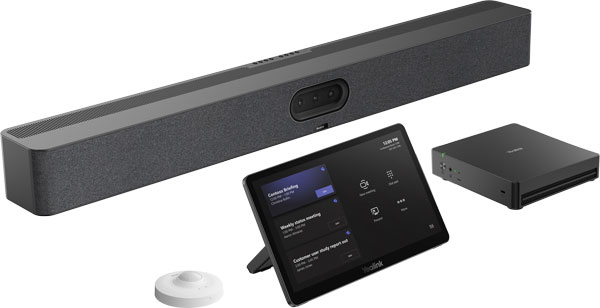
For construction worksite trailers, video bars are a really good idea. They unify your devices — camera, microphone, speaker, and often computer for running the meeting room software — so you won’t ever be hunting for a misplaced camera or microphone.
There are video bars for spaces from huddle rooms to large rooms.
We also recommend using a touch console to control the system. A touch console is a dedicated tablet that’s used to operate a video conferencing system.
Why should you use a touch console? Because you don’t want people to have to bring in their laptops to start a meeting. The video conferencing system should just be ready to go.
And with a touch-based interface, everyone will be familiar with how to use it — it’s just like a smartphone.
The touch console will integrate with your video conferencing platform and let you see the meeting calendar, join a call, or initiate a meeting.
Many platforms support one-touch meeting join: all you need to do is tap a button on the screen.
One-touch meeting join is a feature of the video conferencing platform you use, not the device. It is often integrated into email and workplace chat, so you can just tap a link and the meeting will start.
In-person collaboration can also be enhanced by the video conferencing system.
Let’s take a closer look at this one.
Interactive Whiteboards for Construction Jobsites
Interactive whiteboards kill two birds with one stone.
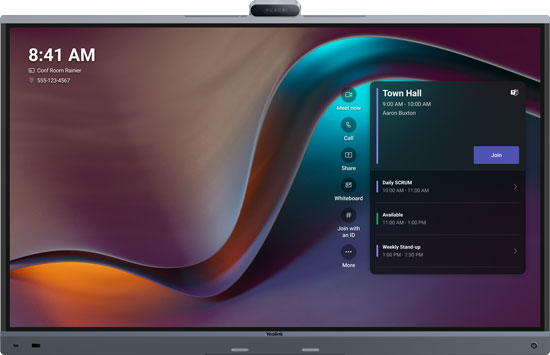
They’re all-in-one video conferencing and in-person collaboration solutions. They incorporate a video bar — camera, microphone, speaker, codec — plus a professional display with touch and stylus support.
They’re also known as touchscreen displays, touchboards, collaboration displays, and a bunch of other names.
First off, an interactive whiteboard works as a complete video conferencing solution by itself. It can run the meeting room software. It has all the integrated pro-grade components that a video bar has. And it’s also a large TV.
Its touch support, though, makes it something more.
Annotating images and documents as a group provides an efficient, visual solution for thinking through plans and blueprints. You can highlight areas of emphasis and make necessary changes — all with a digital record.
You are the football announcer using the teleprompter, circling the important areas that need to be addressed. (Hopefully you won’t be using it to show pass interference or holding penalties.)
With touchscreen displays, a key consideration is how you’re going to mount it. We recommend you get a movable stand, because even if the trailer is on the jobsite for two years, you’ll want to use the display for longer. Look for stands with space for holding equipment.
Because mobile office trailers are, by definition, remote locations, managing the video conferencing system should be decentralized. Remote management platforms are your solution.
Remote Management Platforms for Construction Jobsites
We wanted to touch on one last topic: remote management of a video conference system.
It’s likely not the case that your IT manager will be on-site all the time. But they need to be available — right away — to fix any issues with the video conferencing equipment.
Because mobile office trailers are, by definition, remote locations, managing the video conferencing system should be decentralized. Remote management platforms are your solution. They might also be called cloud management platforms or something similar.
These cloud-based platforms might be through a video conferencing service like Microsoft Teams or they might be through the manufacturer.
For example, Poly video conferencing devices are managed through Poly Lens. Logitech has Logitech Sync. Yealink has the YMCS: Yealink Management Cloud Service.
The manufacturers also provide applications for managing USB devices like USB video bars, which can be separate from the other platform. These devices, however, are typically managed locally and not remotely.
Look for video conferencing devices and systems that are compatible with remote management platforms.
With remote management platforms, you can integrate devices, set users, configure security, and much more.
Crucially, if you run into any hiccups, you can have someone troubleshoot the devices from anywhere. Your IT manager doesn’t need to be on-site.
Remote management platforms are a must.
Pro-grade video conferencing at construction worksites is a powerful tool for business success.
We have helped businesses like yours succeed for two decades. Our no-nonsense experts are standing by to help your construction company find the optimal solution.