


Key Takeaways: Base stations for wireless headsets can perform many useful functions to improve your business communications experience, from charging the headset to connecting it to multiple devices to simplifying conference calls to adding USB ports to your computer. Knowing what functions to look for empowers you to purchase the best headset for your specific needs.

Office headsets come in many varieties from everyday corded USB headsets to on-the-go earhook Bluetooth headsets to luxurious over-the-ear Active Noise Cancellation headsets.
How do you know what to look for? (Starting with our Headsets Buyer’s Guide is a good idea.)
Here’s something that often gets overlooked: some wireless headsets for work have base stations. Why? Are all base stations made the same?
It’s kind of an ambiguous name: base station.
And the ambiguity goes deeper, because headset base stations perform multiple functions and the functions they do perform can differ from model to model.
In this blog, we explain all the various functions that headset base stations can perform, so when you’re shopping for your next business headset, you’re empowered and knowledgeable.
Let’s get into it!
Table of Contents
- Chargers & Headset Holders
- Multiple Device Connectivity
- Bluetooth Connectivity
- Speakerphones
- Local Headset Conferencing
- USB Hubs & Device Charging
- Touchscreen Displays
- Accessories: Wireless Charging Pads & Busylights
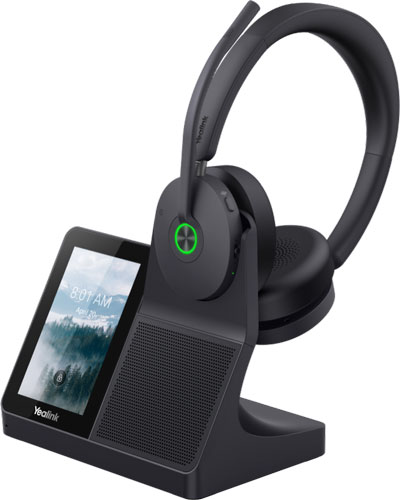
What Are Headset Base Stations Used For?
Headset base stations are for wireless headsets.
Let’s back up a bit. There are two types of wireless headsets: DECT and Bluetooth. They use different protocols and different parts of the wireless spectrum for connectivity.
Bluetooth headsets use the familiar Bluetooth protocol, which means you can use them with a wide range of devices, from smartphone to tablet to VoIP phone to computer (usually via a dongle). Flexibility and interoperability are Bluetooth’s big advantages.
DECT headsets have their own advantages. They have a much greater wireless range than Bluetooth headsets and, because they use a section of the wireless spectrum that doesn’t compete with Bluetooth or Wi-Fi devices, they reduce spectrum density, which can improve signal strength for all wireless devices in the area.
DECT headsets can’t connect to your devices natively like Bluetooth headsets can. They use either a DECT dongle or, more often, a base station.
While Bluetooth headsets can connect to other devices natively, there are certain Bluetooth headsets that use base stations to enable multiple device connectivity.
We’ve arrived at the base station.
Chargers & Headset Holders
The most basic functions that a headset base station perform are charging your headset and providing a convenient place to store it when you’re not using it.
Many headsets come with a base that only acts as a charger/holder. Usually these are called charging cradles or charger pads or similar, but sometimes you’ll see them called bases or similar.
These bases are simple to understand. Charge. Hold. Not much more to say.
Let’s talk about headset base stations that do more. Like connect your phone to devices.
Multiple Device Connectivity
The next most common use for headset base stations is to connect your wireless headset with a computer and a VoIP phone at the same time so you can take calls from both devices.
While it’s not necessary that the devices are a computer and a phone, these are by far the most common devices connected to by base stations.
It’s also important to know that the headset’s base station needs to be compatible with the specific model of phone you’re using, so doublecheck compatibility before purchase. This process might involve purchasing a separate cable, although the complexity of the situation has been, thankfully, greatly reduced in recent years.
The base station connects to the computer and phone via cables. The headset connects to the base station wirelessly via DECT or Bluetooth.
By having a base station connected to both devices, you can take calls from either the softphone running on your computer or from your desk phone.
You switch between source with a tap of a button or a tap on the base station’s touchscreen display, depending on the model of base. Some base stations let you combine calls from multiple sources, a simple solution for initiating a conference call.
Dual connectivity expands the utility of the headset beyond what a headset without a base station offers.
In fact, base stations can go one step further and enable triple connectivity by adding Bluetooth to a DECT headset.
Bluetooth Connectivity
Some base stations enable Bluetooth connectivity for DECT headsets that don’t natively support Bluetooth.
There aren’t many headsets that support both DECT and Bluetooth natively — that is, a headset that connects via both methods by itself. One example of these is the recent Yealink WH64 Series, which connects directly to Bluetooth devices like smartphones and which also uses a base station for DECT connectivity to a computer and phone.
Instead of supporting both protocols on the headset itself, there are DECT headsets whose base stations support Bluetooth.
In this arrangement, the base station is the device that connects to, for example, a smartphone via Bluetooth — not the headset.
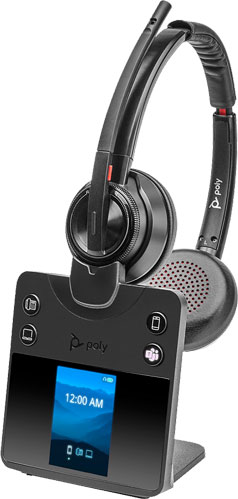
For example, Poly Savi 8400 Office Series Headsets use the Poly Savi Universal Office Base. The headset is a DECT headset, but you can take calls from your smartphone via Bluetooth through the base station.
Triple connectivity — awesome.
These are the core functions of a base station: charger/holder and multi-device connection solution. But some base stations go further.
Speakerphones
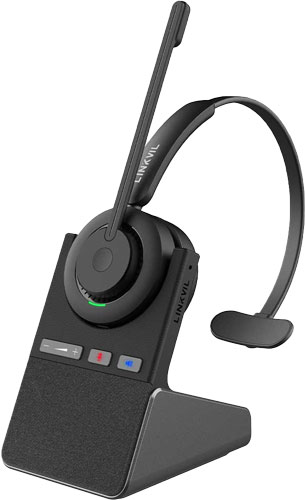
Some base stations, like the one that comes with the new LINKVIL Fanvil DH301D Pro, let you take calls via the base station itself, rather than just the headset.
In this case, you use the base station as a speakerphone, just like an external speakerphone or the speakerphone that’s in your desk phone.
If you like using a speakerphone, this is very convenient.
Local Headset Conferencing
Some base stations can connect to multiple headsets at the same time. Why would you want that?
It’s a streamlined method for conferencing or training.
For example, the base station for the Poly Savi 8400 Office Series can conference up to four headsets at once, so if multiple people want to be on a call they can do so without worrying about having their own extensions added to a call.
Rather than multiple extensions, you have one extension with multiple headsets.
This works well for collaborative calls and is very useful for managers to help workers with training — just hop on the call quickly.
USB Hubs & Device Chargers
Some headset base stations have additional USB ports that can be used to charge devices. This is simply a matter of convenience, like having a hotel phone or clock with USB ports — charge your smartphone as you work.
But sometimes the USB ports are actually a USB hub that gives your computer additional USB ports.
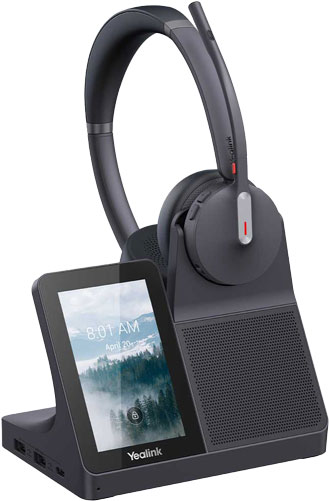
For example, Yealink WH68 Workstation has a USB hub with two USB-A ports and one USB-C port, which can help you connect additional devices or dongles, make your cabling more manageable, and so on.
Touchscreen Displays
Headset base stations have two basic interfaces. They come with buttons — either mechanical or capacitive touch — or touchscreen displays.
Buttons are there to switch between sources and other standard functions. Base stations for Microsoft Teams headsets will have a dedicated Teams button for interacting with the service.
Base stations with touchscreen displays have expanded functionality beyond answering calls, choosing sources, and so on.
In essence, they act as a secondary phone interface. For example, with the Yealink WH68 Workstation, you can dial a phone number, choose a contact from your directory, call back someone from your call history, and so on. You can adjust headset settings like selecting which side of the head you’re wearing the headset on to optimize stereo audio imaging or switching to music mode for improved audio quality as you listen while you work.
While none of these functions are unique to the base station, having them at your fingertips is more convenient than having to switch between phone and computer, dig around in softphone or headset app settings, and so on.
Accessories: Wireless Charging Pads & Busylights
Some companies offer headset base station accessories to expand the utility of the headset system even more.
Yealink leads the way here.
You can connect the Yealink WHC60 Qi Wireless Charger to the base station of Yealink WH66 and WH67 Series Headsets. It then charges your smartphone wirelessly like any other wireless charging pad.
Even better, you can connect the smartphone to the base station via Bluetooth, which lets you use the headset with the smartphone. You could then, for example, hold a video call on your smartphone while having the professional audio quality of a headset and charge the phone at the same time.
Yealink also produces the Yealink BLT60 Busylight, which is compatible with a number of headset base stations, including those that come with the Yealink WH64 and WH68 Workstation Headsets.
Busylights are a common feature on headsets and are appreciated by many people. They are lights that indicate your status to coworkers. When you’re on a call and shouldn’t be distracted, they light up red for busy. Who doesn’t want fewer distractions in the office?
Using an external busylight like BLT60 has one big advantage over using the busylight built into the headset: you can position it for better visibility. You can put it on your phone or on your monitor or on the cubicle divider or wherever is best for people to see your status. When you’re taking a call, it lights up red — busy.
As you can see, the humble wireless headset base station can be quite a powerful tool for improving business communications!