

Saving money is something everyone can get behind. Streamlining your public notification system can help save money.
We’ve picked up a whole bunch of tips and tricks for streamlining communications systems of all types.
Here’s a tip for you:
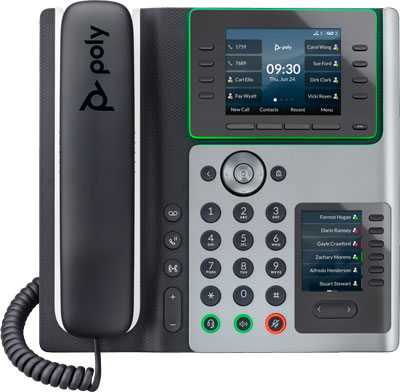
Connect a compatible Algo IP speaker or visual alerter to a Poly Edge E Series phone using the Algo 2507 Ring Detector.
Avoid paying the additional license or user fee for the IP endpoint. Stop worrying about paging endpoint compatibility with your phone system.
Streamline and save money.
This system optimization method enables loud ringing and other audio notifications via the phone’s extension. It also works for visual alerts from strobe lights.
For the method, check out the video Dylan has just put up. His easy-to-follow instructional video shows you how to connect Algo 8180 to Poly Edge E450. He then guides you through configuring 8180 using its web interface. A similar method applies to all compatible devices.
Below the video, in this blog, we explain how it works, clarify device compatibility, expand on benefits, and explore scenarios. We also get into how to use it with multicast.
How Algo 2507 Works
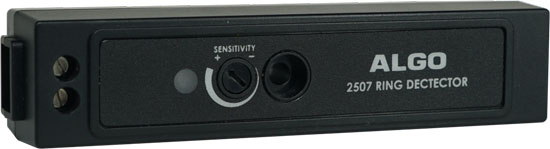
Algo 2507 uses low-level audio from a compatible phone’s headset jack to provide an isolated signal that activates a compatible Algo IP endpoint.
As Dylan covers in the video, you connect the ring detector to the phone using the RJ9 jack on the back of the phone that’s normally used for corded headsets. You then connect the ring detector to the paging endpoint using the relay input connections on the back of the paging endpoint.
Make sure the phone is set to ring through the headset and that the ringing volume is turned all the way up.
You then configure the endpoint using its web interface, as Dylan shows you in the video.
Note that this setup does not work for voice paging, background music, and the like. It only works for audio and visual notifications.
Algo 2507 Compatibility
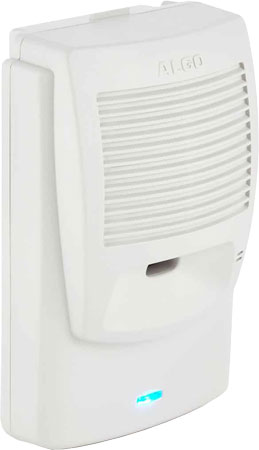
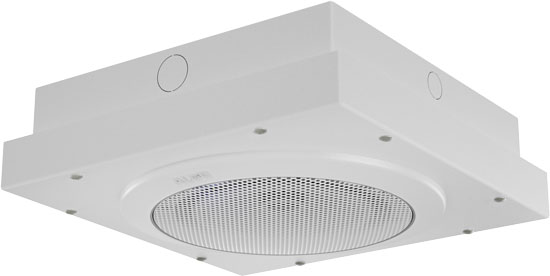
Algo 2507 Ring Detector is compatible with most Algo IP Speakers, including 8180 IP Audio Alerter, 8186 IP Horn Speaker, 8188 IP Ceiling Speaker, and more. It is compatible with the 8190 and 8190S IP Speaker/Clock, as well as the 8128 and 8138 IP Strobe Lights and the 8301 IP Paging Adapter and Scheduler.
It’s a versatile device!
In terms of phones, it is currently compatible with models from the Poly VVX, CCX, and Edge E Series.
This compatibility information is accurate as of December 2025 and might have changed after publication.
For the most up-to-date compatibility, visit the Algo 2507 Product Page (external link) on Algo’s website.
Benefits of Using Algo 2507 with a Poly Edge E Phone
Why would you want to connect an Algo SIP speaker to a Poly Edge E Series phone using the Algo 2507 Ring Detector?
There are two big reasons:
- Save money on licenses/fees
- Avoid compatibility issues
Algo 2507 can reduce the number of licenses, fees, or registrations you need to pay for.
Let’s explain. Often, if you use an IP endpoint like Algo 8180 with your VoIP phone system, you may need to get a device/extension license for the endpoint.
However, if you connect the endpoint to the Poly Edge E phone using 2507, you don’t have to pay this license, because the endpoint uses the same extension as the VoIP phone.
The same goes for hosted VoIP services. With hosted VoIP and cloud phone services, you typically pay a recurring subscription fee for every device that uses the service.
However, if you use the Algo 2507 arrangement, you don’t need to pay for an additional device fee. For the service, it’s all just one device: the Poly phone. No recurring subscription fee.
Algo 2507 can also help you use endpoints with systems and services without worrying about compatibility.
Sometimes, it can be very hard or even impossible to know if a paging device is compatible with a VoIP phone system or hosted VoIP service.
However, with the 2507 arrangement, all you need to know is if the Poly Edge E Series phone is compatible with the system/service.
Because Poly phones are great devices and are very popular, they’re supported by a huge range of systems/services. Compatibility information for them is, most of the time, very easy to find out.
No need to worry about compatibility so much anymore.
Scalable Systems with Algo 2507 and Multicast
Algo 2507 works with multicast, so you can connect multiple endpoints to a single Poly phone using Algo 2507. It’s a scalable solution.
The multicast configuration works like this:
An Algo IP endpoint is connected to an Algo 2507, which is then connected to a Poly phone. This connection is hardwired.
Additional compatible IP endpoints are connected to the first endpoint through the network. This connection is not hardwired. Because they are network-connected, IP endpoints, they only need to be on the same subnet or VLAN as the first endpoint.
The first endpoint is configured to be a multicast transmitter. The other endpoints are configured to be multicast receivers.
You now have a distributed audio and/or visual notification system, all leveraging the Poly VoIP phone’s single extension.
Pretty great, eh?
Scenarios for Using an Algo Speaker or Strobe Light with Poly Edge E Phone
When would you use an Algo speaker or strobe light with a Poly Edge E phone via Algo 2507?
The arrangement works for any scenario in which a loud ringer and/or strobe would be used.
Loud ringers amplify a phone’s ringing to help people hear it over surrounding noise. Noisy environments where loud ringers are effective include manufacturing plants, busy offices, transportation terminals, automobile garages, and more.
Visual alerters are also effective in loud environments. People don’t need to hear the phone’s ringing: they can see it. Using a visual alerter also improves accessibility for hearing-challenged individuals.
Using Algo 2507 is especially useful for large areas where people might be far from the phone. It’s a simple solution for creating a streamlined, distributed notification system.
If you’d like to know more, check out our blog, “Loud Ringers and Strobes for VoIP.”