


IP paging speakers have changed the game. Because an IP paging system is managed and operated using a computer interface, you can do more with it than with a traditional analog paging system.
They’re simpler to manage as a unified system — and who doesn’t want simplicity right now? It’s easier to add new speakers, setup new schedules, customize alert tones, broadcast music from a streaming service… They’re simpler in a lot of ways.
But they’re also more versatile, able to do more.
In this blog, we cover all the functions that IP paging speakers can perform.
Let’s get into it!
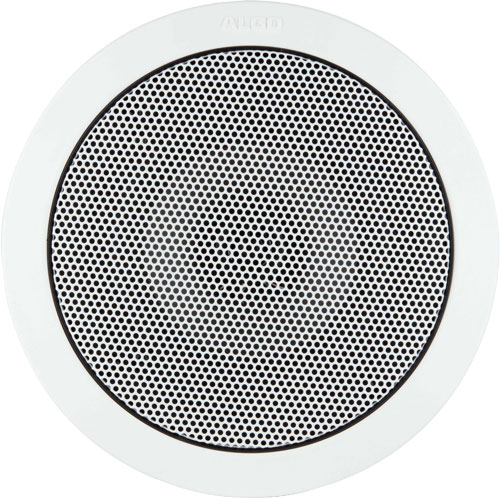
What Functions Can You Use IP Paging Speakers For?
IP paging speakers are speakers that are connected as a system using standard network technology like Ethernet cables, network switches, and so on. They’re configured, managed, and operated via a computer interface, usually an application, or as part of a larger VoIP system.
Through the system, you can use IP paging speakers for many functions, including:
- Voice Broadcasting
- Music
- Bell Scheduling
- Loud Ringer & Night Ringer
- Emergency Alerts
- Sound Masking
- Two-Way Communications
If you’d like an in-depth introduction to IP paging speakers, check out our blog: What Is an IP Paging Speaker? (Feature support is dependent on device and system capability.)
Voice Broadcasting
Paging systems aren’t called PA systems for nothing: one of their primary uses is for public address. You can broadcast both live and prerecorded audio.
Many IP paging speakers like Algo 8198 support HD audio quality, which is produced both in the physical construction of the speaker and in the audio codecs that they support. HD audio quality is better than what the vast majority of analog paging speakers can produce. Having better audio quality can improve comprehension — and understanding a voice broadcast is the whole point.
So IP public address speakers can improve the fundamental quality of voice broadcasts.
What do you use as a microphone for an IP paging system? It depends on the paging system, but commonly you use a VoIP phone or a dedicated microphone. Some companies produce dedicated paging consoles, like the Valcom EZ-TCD. If you use a VoIP phone, you should be able to set a speed dial key to “call” the paging extension, making it into a quick and easy paging microphone.
Most IP paging systems will allow you to prerecord messages and broadcast them either ad hoc or on a schedule.
Music
With IP paging speakers, manufacturers have leaned into improving sound quality. We just discussed how improving sound quality can improve comprehension on voice broadcasts, but improved sound quality is even more important for playing music over the PA system.
Virtually every retail store wants to play music over the paging system. Take advantage of the enhanced sound quality offered by IP paging speakers and produce a more pleasant and immersive experience for customers.
Many paging systems now integrate with streaming services, giving you access to an endless playlist.
As with many other paging functions, you also don’t need to have a separate device for background music when using an IP paging system, which would sometimes be the case with analog systems.
Bell Scheduling
Bell scheduling is a necessary function for schools, factories, warehouses, and many other places of education and employment.
With IP paging systems, bell scheduling is simplified. It’s easier to customize schedules and you’ll likely be able to adjust them in a more fine-grained fashion. You may be able to customize bell schedules per zone and other useful functions.
As with background music playing, you won’t need a separate device. And you won’t need to worry about setting the time or adjusting it for daylight saving. An IP paging system uses NTP (Network Time Protocol) to set the time, the same protocol that keeps the time on your smartphone always accurate.
Additionally, it’s generally easier to upload a MP3 or WAV file as a custom bell tone via the system’s UI — usually it’s just drag and drop.
Loud Ringer & Night Ringer
IP paging speakers are a simple solution for making incoming calls more audible.
Essentially what you do is set up a paging speaker as a complementary extension, so when a call comes into a phone, a ringer tone is played over a paging speaker, too. This can help with accessibility or with a dispersed workforce that isn’t near the phone all the time. It’s also important for nighttime security staff who walk around a building.
You can use dedicated loud ringers or pretty much any IP paging speaker. Sometimes you will need to use the “night ringer” function (or similar) in the user interface to send the call to multiple speakers, if that’s what you want to do.
Emergency Alerts
A paging system is a necessary part of a public emergency system.
IP paging speakers are the frontline of emergency notifications. With IP paging systems, you can play prerecorded emergency messages or broadcast live. You can integrate the paging speakers with other devices in the system like intercoms or phone towers, making the emergency alert system more scalable than with analog systems.
We cover this topic in detail in our blog: How to Broadcast Emergency Notifications from a Paging System.
With most IP paging systems, it’s very easy to integrate additional alerting devices like strobe lights with the paging system. Strobes in particular are important for accessibility and for loud areas like factories where pages or alarm tones might not be heard.
One widely used platform for emergency alerts is Singlewire InformaCast, which is a mass notification solution. There are many IP paging speakers with firmware tailored for using the speaker as part of an InformaCast system. We wrote a whole blog about it: Mass Paging with Singlewire InformaCast.
Sound Masking
A highly specific use-case for IP paging speakers is sound masking. This means the speaker emits white noise to effectively camouflage speech. We’ve written a whole blog explaining sound masking speakers in detail — they’re a fascinating privacy solution.
Sound masking speakers are highly valuable in sensitive locations like hospitals. If you don’t want people to overhear conversations, look for sound masking IP paging speakers.
Two-Way Communications
Some IP paging speakers can be used for two-way communications. For this to be possible, the speaker needs a microphone. Some speakers have built-in microphones: these are often called talk-back speakers. You can often use an external, network-connected microphone, too. To initiate conversations, you usually use a network-connected button.
Establishing two-way communications makes the paging speaker into, in essence, an intercom. It could be very useful for, to take one example, a schoolteacher to have access to a two-way speaker; they would be able to talk to the principal’s office directly as needed.
As you can see, IP paging speakers are highly versatile communication devices!