

Key Takeaways: AV Over IP provides the premier network-connected solution for professional communications. By knowing the devices that compose an AV Over IP system, you can help your business establish a first-class AV system for video conferencing and more.

Installed audio systems are the gold-standard for professional sound quality on group calls in dedicated meeting rooms.
Having a conference room with installed microphones and speakers that are integrated with your communications system to make the call process seamless and the audio quality first-class — you can’t do better.
As business communications has adopted network technologies, AV Over IP has emerged as the premier solution for installed audio systems for video conferencing.
The difference between AV Over IP systems vs traditional AV systems is comparable to the difference of VoIP telephony vs traditional PSTN telephony. The newer, network-based solution offers many benefits: scalable infrastructure, centralized management, greater distance, interoperability with modern communications platforms, and much more.
Now, you might be wondering if AV Over IP is only applicable to video conferencing. Not at all. AV Over IP systems can be used for concert halls, stadiums, billboards, and so on. But here we’re focusing on using AV Over IP in the context of business communications, especially video conferencing.
In this blog, we introduce AV Over IP and the devices that are used in an AV Over IP system.
Let’s get into it!
Table of Contents
AV Over IP for Business
AV Over IP refers to a suite of dedicated devices and network protocols that create a professional multi-channel audio ecosystem for video calls in meeting rooms:
- Audio plus video — AV
- Uses network technologies — Over IP
While, in essence, there’s little to no difference between an AV Over IP system and a system that uses a conference phone or video bar for audio — they both use network technologies for AV — the former is distinguished by the types of devices that are used and the number of AV channels that are supported.
An AV Over IP system consists of dedicated microphones and speakers whose multiple feeds are managed by a variety of devices. These audio devices are integrated via a network switch with video conferencing equipment to create a unified, IP-based AV system in a meeting room. The whole system is operated via a computer connected to the same network.
As is often the case with tech, you need to know other names for the same thing.
AV Over IP is often abbreviated to AVoIP. It might be referred to as networked audio. Pro AV and installed audio conferencing equipment don’t always refer to AV Over IP, because they’re not necessarily networked solutions, but frequently they do. Manufacturers might be even vaguer, referring to just an audio ecosystem or AV conferencing environment.
There are several competing AV Over IP protocols. We covered one of the most popular recently: Dante Audio In Conference Rooms. In that blog, we also covered in detail why an AV Over IP system requires a different protocol than your other communications. Here’s the tl;dr:
- Multi-channel audio
- Ultra-low latency
- Uncompressed audio
These features are necessary for AV Over IP, but they’re not handled as well by, for example, VoIP protocols. AV Over IP protocols are developed to better handle these specific features.
Because the network traffic of an AV Over IP system needs to be ultra-fast and ultra-reliable, most if not all AVoIP devices are connected via Ethernet cabling, not Wi-Fi.
AV Over IP systems can be used with a wide range of video conferencing platforms, including Microsoft Teams Rooms. That said, you need to check compatibility. Not every AVoIP device is compatible with every platform. Check compatibility before purchase.
What Are the Benefits of AV Over IP?
In the introduction, we claimed that AV Over IP is the gold-standard for sound quality for video conferencing.
This is true, but there is one qualification:
We’re talking about medium-sized conference rooms and bigger. AVoIP systems are multi-channel audio systems. You don’t need a multi-channel system for a huddle room — a conference phone or video bar is more than enough.
But for larger spaces, you can’t beat AV Over IP systems.
Most importantly, you get to install devices in optimal locations for voice pickup and broadcasting. Speakers and microphones will be close to meeting participants without cluttering up the workspace.
The system will always be there. No one will need to worry about bringing in their own AV equipment.
Multi-channel AVoIP systems are better equipped to handle groups where numerous people will be speaking, which can lead to improved collaboration. Everyone’s voice can be heard better. And you may be able to set up sound reinforcement and/or voice lift to help people in the room hear calls even better.
The AV system will be unified. Control and system management will be streamlined and always available.
They’re much more scalable than traditional AV systems. Because they’re network-connected solutions, you can have multiple AVoIP systems controlled from a single workstation.
Ethernet cabling is comparatively inexpensive to run and doesn’t require specialized technicians.
Here’s a surprisingly big one: the meeting space will look great. AVoIP systems provide a clean, professional working space.
One final benefit is the answer to this question: are AV Over IP systems only used for video conferencing?
We’ve been emphasizing the “V” part of AV quite a bit. But AV Over IP systems can be used equally well for audio calls. By the way, if the system is only used for audio calls, you might see the term AoIP — Audio Over IP — or audio conferencing system.
There are a few drawbacks. AV Over IP systems are complicated. There are competing protocols you need to choose between. They can be expensive. Because they’re installed solutions, the meeting space becomes inflexible.
These drawbacks are counterbalanced by the benefits.

What Devices Are Used for AV Over IP?
AV Over IP systems consist of several different types of devices. The primary types are these:
- AV Over IP Microphones
- AV Over IP Speakers
- AV Over IP Video Conferencing Equipment
- Network Audio Devices
- Network Switches for AV Over IP
Whatever equipment you use, the devices must be compatible with each other and with the communication platform or service you’re using.
Compatibility is key. Always triple check compatibility before purchase!
AV Over IP Microphones
AV Over IP microphones are used for voice pickup. They’re typically installed in or on the ceiling.
An AVoIP microphone will be beamforming and have advanced noise reduction.
Beamforming means the “microphone” is actually a microphone array that uses differences in sound wave pressure to pinpoint where a voice is coming from, then focuses in on that voice. The result is the microphone picks up less noise.
Noise reduction technologies are diverse. They typically use algorithms to filter out human voices from environmental noise. Often, these algorithms are now improved by AI.
The typical AVoIP installation incorporates multiple microphones. After all, a single microphone can only pick up voices clearly out to a certain distance. To ensure crystal-clear voice pickup in larger meeting rooms, you’ll need multiple mics spaced in such a way that there are no gaps in coverage.
While the typical AV Over IP mic is ceiling-mounted, you may also use table microphones or handheld microphones. You may also be able to incorporate traditional analog microphones into an AV Over IP system.
AV Over IP Speakers
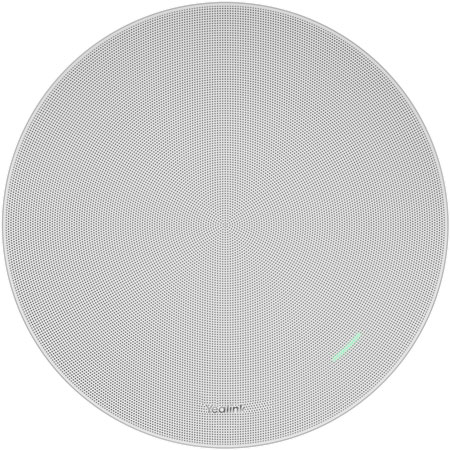
AV Over IP speakers are used for voice broadcasting. They’re typically ceiling mounted, like the microphones.
The advantage of ceiling-mounted speakers for business calls is that they’re positioned near to people while still being out of the way.
Using a video bar is an excellent solution for small rooms, but in larger meeting rooms people in the back will have a hard time hearing audio broadcasted from the front of the room.
AVoIP speakers make it much easier for people to hear what’s being said. That is a big, big benefit.
There are speakers specifically designed for AVoIP. With some systems, you may be able to use traditional paging speakers, which might require additional adapters and/or amplifiers.
AV Over IP Video Conferencing Equipment
Now we come to the “V” part of AV Over IP.
Video conferencing equipment for AVoIP is the same equipment you need for any video conferencing system: camera and display. Actually, often that’s plural: cameras and displays.
For an AV Over IP video conferencing camera, you’re probably looking at a PTZ camera or multi-lens camera with at least one telephoto lens. This is because AVoIP video conferencing systems will be used in larger spaces, so people will be sitting farther away. You want the camera to be able to pick out individual faces.
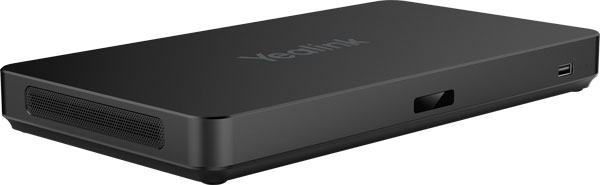
Often, AV Over IP systems use multiple cameras to ensure proper coverage of the whole space. Multi-camera video conferencing systems require a device like Yealink AVHub that can manage multiple video feeds.
You’ll also need a video conferencing display. To connect the display, you’ll need a decoder or other device that can translate between Ethernet and HDMI signals. If you want to use more than one display, make sure the video conferencing platform and the devices you use to manage the video feeds support multiple displays.
If you’d like to go deeper, check out our expert, detailed Video Conferencing Buyer’s Guide.
Network AV Devices
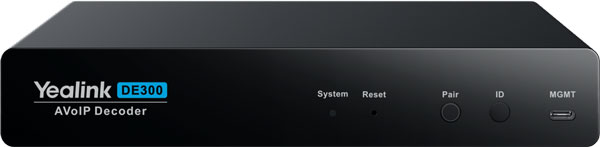
There are a variety of devices used in AV Over IP systems that we’re going to group together as “network AV devices.” These include encoders, decoders, DSPs, amplifiers, network audio interfaces, and device managers.
Note that not every AVoIP system uses all of these, and some devices might incorporate the functions of multiple devices into one unit.
Audio feeds in an AV Over IP system need to be routed, clarified, and equalized. Network AV devices perform these functions — and more.
- Routed means the signals coming from a microphone and going to a speaker are sent to the correct device at the same time. You don’t want speakers to be broadcasting audio at different times — that’s highly distracting.
- Clarified refers to how these devices often provide noise and echo reduction.
- Equalized means each speaker on the system broadcasts the audio feed at the appropriate volume. You don’t want one speaker to be playing the conversation much louder than the others.
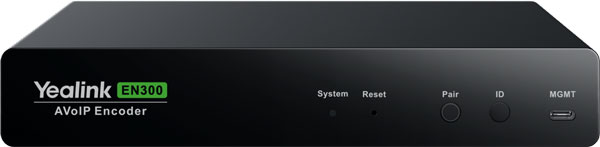
Encoders and decoders translate audio and video signals between AV endpoints and the IP switch(es) that manages the network traffic. They are part of the signal routing solution.
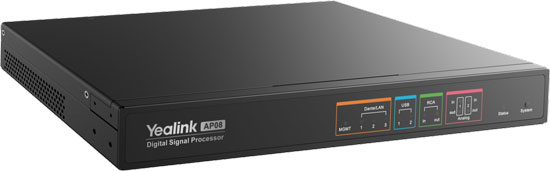
DSPs can also help with signal routing, but they’re mostly used to clarify and equalize audio signals. DSP stands for Digital Signal Processor. In the context of AV Over IP, a DSP is, essentially, a sound mixer with noise and echo reduction.
Because some AVoIP DSPs are smart devices, they can make system setup much easier with features like automatic acoustic optimization, which means the system will adapt microphone and speaker performance to the specifics of the environment to reduce echoes, improve voice pickup, and so on.
Network audio interfaces or network audio adapters are devices that translate between analog and IP signals to let you incorporate analog microphones and speakers with your AV Over IP system.
In the context of AVoIP, amplifiers are used to power passive paging speakers.
System managers and device managers are dedicated appliances for managing AV feeds.
Speaking of which…
Network Switches for AV Over IP
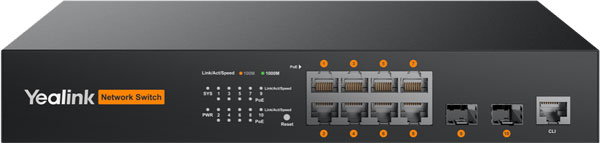
Because an AV Over IP system is network-based, it requires a switch to connect devices and manage data traffic.
Using network switches is actually one of the key advantages of AV Over IP systems over traditional AV systems.
Adding ports to connect more devices to a system is vastly easier with a network switch than with a traditional AV switcher, making the system much more scalable.
There are switches from companies like NETGEAR and Yealink that are specifically designed for AV Over IP applications. These switches come with features like QoS settings preconfigured to optimize audio and video data traffic and custom user interfaces for quick access to AV configurations.
It’s not necessary to use one of these AV switches, but they will make your life easier.
What AV switch features should you be looking for? Look for a switch with high throughput — video is a resource intensive and real-time application — and ultra-low latency. Static routing support can make network traffic faster. Automatic multicast support helps with routing traffic to multiple devices efficiently.
You might also want a PoE switch, which can power connected devices (if they support PoE).
We covered one additional concern with network switches for AV Over IP in our blog: Conference Room Microphones and Energy-Efficient (EEE) Network Switches. EEE saves energy by putting switch ports to sleep when not in use, but the process of turning the ports back on can cause lag, which is bad for real-time communications. It’s like watching a movie where the soundtrack is slightly off — not good.
Want to get started with a professional AV Over IP system for video conferencing? Our friendly experts are waiting to hear from you!