


What’s the difference between a professional-grade headset and a consumer-grade headset? Is there a difference?
Yes. Headsets for business have features that set them apart from headsets for consumers, making them a more than worthwhile investment for productivity and success.
In this blog, we go through 8 advantages of business-class headsets. If you’re wondering about the difference between headsets for work and headsets for gaming, we cover that topic in a separate blog.
Whatever you call them, we cover them. Enterprise-grade headsets. Business-grade headsets. Professional-grade headsets. Pro-grade headsets. Even just office headsets or headsets for work.
Let’s get into it!
Table of Contents
- Platform Integration
- Device Compatibility
- Management Applications
- Voice Clarity
- Audio Quality
- Busylights
- Hearing Protection
- Inline Call Controls
Reason #1 — Platform Integration
Seamless integration between your headset and communication platform is a key benefit of business headsets.
The fundamental purpose of your work headset is to be used with your business’s communications platform of choice.
Many headset manufacturers work closely with vendors of communication platforms — for example: Microsoft Teams, Zoom, Google Meet — to provide headsets certified for those platforms.
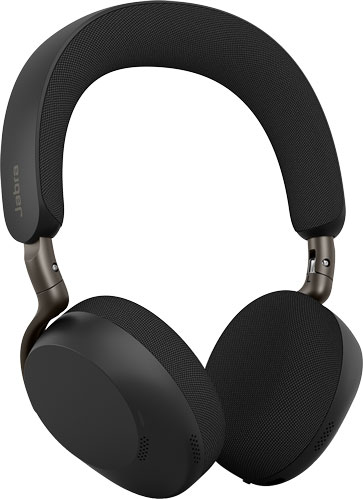
Even if a headset isn’t certified — many companies don’t have certification programs — it may be tested for compatibility with platforms. For example, the new Jabra Evolve3 75 has been tested with Microsoft Teams, Zoom, Google Meet, Alcatel-Lucent, Cisco Webex, Unify, and more.
If you want a headset to integrate with a workplace communications platform, a pro-grade headset is your best choice.
Reason #2 — Device Compatibility
Your workplace headset needs to be compatible with all your business communications devices. At this point, consumer headsets tend to be Bluetooth; there are many Bluetooth business headsets, too.
But there are many more types of business headsets when it comes to connection options. These options range from traditional wired headsets that plug into an RJ9 port on your phone to wireless DECT headsets whose base stations connect to multiple devices at once.
We recently covered headset base stations. These can offer multi-device connectivity so you can easily take calls from your phone and your computer — and often your smartphone, too.
On top of headset connectivity options, headsets are often tested for compatibility — or even designed for compatibility — with specific devices. For example, the new Fanvil DH301D Pro is a DECT headset that works with many VoIP phones, computers, and mobile devices; it’s been tested for compatibility with Fanvil V and X Series VoIP phones. If your business uses Fanvil phones, having an end-to-end, single-brand communications system is a guarantee of top performance.
Reason #3 — Management Applications
Headset management applications are a big plus.
There are two types of management applications. Let’s call them personal and system.
Personal headset apps like Jabra+ and Yealink USB Connect allow the user to adjust settings, enable ANC or sidetone, change the equalizer mode, and so on. Many consumer-grade headsets offer similar personal headset apps.
But professional headsets also, frequently, can be managed with system-wide headset applications. Jabra Xpress and Yealink Management Cloud Service are two examples.
Professional headset management applications allow system administrators to manage headsets through the cloud as a fleet, whether that’s assigning headset to workers, running firmware updates for every headset at the same time, viewing call analytics to improve productivity, remote troubleshooting, and more.
An enterprise-class solution for every headset your business uses — that’s a headset fleet management application.
Reason #4 — Voice Clarity
Professional headsets provide professional audio quality — that’s a given. We’re going to break down audio quality into two sections: how good your voice sounds for people you’re talking with and how good audio sounds for you.
Professional headset microphones are designed for voice clarity. There are many ways they achieve clarity.
The microphone, most of the time, is placed in front of your mouth with directional microphone(s) to pick up your voice and not surrounding noises. Some headsets will let you know if you’ve positioned the microphone properly.
The audio stream is further clarified using a range of technologies.
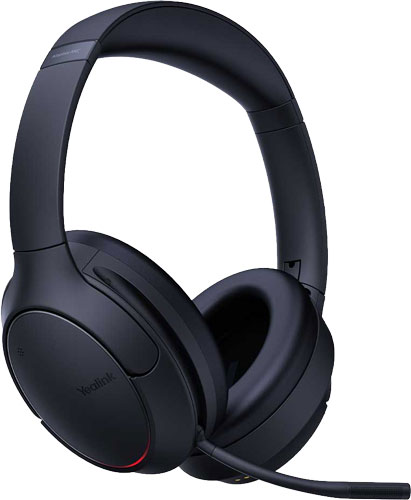
For example, the newly announced Yealink BH78 uses an AI algorithm powered by an upgraded chip to analyze the data from its 4-microphone array. It accurately differentiates your voice from environmental noise, reducing up to 98% of background distractions. It also has Acoustic Shield technology, which is another noise cancellation method by which the headset determines how far away a sound is coming from, then eliminates sounds coming from more than a given distance away. Plus it has wind noise suppression.
Professional-grade headsets go above and beyond to make voice quality excellent. There are also quality of life features that make the business communications process more pleasant, like mic booms that mute and unmute the microphone when you flip it up and down.
Reason #5 — Audio Quality
Now let’s talk about what you hear.
Both professional-grade and consumer-grade headsets often offer excellent noise cancellation, including Active Noise Cancellation (ANC).
How the audio is tuned is different.
Headsets for work are headsets for calls first.
Professional headsets emphasize audio quality for calls, rather than music, which most consumer headsets emphasize. That said, many headsets for work make excellent headsets for listening. They might even have features like Dynamic Equalization (EQ) that automatically optimizes audio quality based on your current use: calls or music.
Having audio quality tuned to voice communications can improve comprehension, which is a big bonus. In fact, it can be a must for projecting a professional impression to clients, because you can follow the conversation better.
Reason #6 — Busylights
Busylights are indicator lights integrated into a headset for displaying your status publicly. They’re the headset equivalent of presence on a phone: red for busy, green for available.
You’re not going to find them on consumer headsets.
While a comparatively minor feature, many users really appreciate them, because they reduce distractions.
They make it easy for you to see, even from across the room, when your coworker is busy, and they let your coworker know when you need to focus.
It’s a productivity feature through and through. And a good one at that!
Reason #7 — Hearing Protection
There are two potential sources of hearing damage when using a headset for work: long exposure to loud noise and sudden spikes in volume.
Through the headset management application, you can enable hearing protection features. For example, the new HP Poly Mission Series headsets come with SoundGuard Digital, which is an acoustic limiting solution: time-weighted average control for long-term exposure and anti-startle control for sudden sound increases.
Headsets for business — especially call center headsets — can be used for long periods of time. Your ears need protection.
It’s not uncommon for volume levels to be dramatically different from call to call. Let’s say you turn up the volume because someone is talking on a speakerphone and their voice sounds distant so it’s hard to understand them. Your next call is to someone at a construction site, but you forgot to turn the volume back down. Your ears are going to hurt.
Professional-grade headsets protect your ears.
Reason #8 — Inline Call Controls
Most business-class headsets have integrated call controls to make it easier for you to take and manage calls.
There are two types of call controls for office headsets:
- On the headset
- Inline call control unit
Many consumer headsets have integrated call controls, whether those are physical buttons or capacitive touch interactions.
Inline call controls are situated on the cable that connects a wired headset to a computer or phone.
Wired headsets are reliable and, typically, more cost-effective than their wireless equivalents. That’s why they’re still commonly used for business.
Many people find inline call controls more intuitive to use. You can see what you’re pressing instead of having to reach up to an earphone to press a button you can’t see.
And you can also see why business-grade headsets are a great investment.