

Glass walls are common in offices and other places of work. They allow natural light to fill the office space. They can help collaboration while keeping conversations private. There are a lot of reasons why they’re so popular.
But there are some downsides to glass walls.
When they’re used in video conferencing rooms, they can affect audio and video performance.
In this blog, we present simple solutions for common challenges presented by glass walls in meeting rooms. We cover solutions for both audio and video challenges.
Let’s get into it!
Glass Walls in Meeting Rooms Are a Problem
Glass walls present two primary challenges for meeting room technology, one for video and one for audio.
For video, the challenge relates to the automatic technologies that are now standard with most professional video conferencing systems and video bars. These technologies include speaker tracking and group framing.
For audio, the challenge relates to echoes.
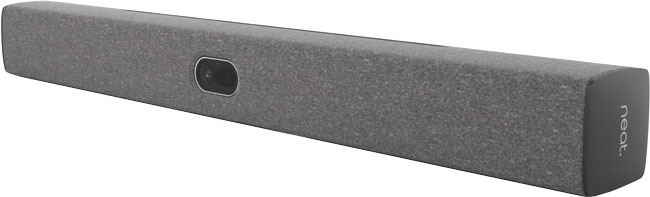
Let’s take them one by one. For simplicity, we’re going to use video bars as our example of video conferencing hardware.
Video
Most professional-grade video bars now support technologies to provide a director-like experience automatically. These technologies are highly desired by businesses who want a more natural feel to their video calls and virtual meetings.
Speaker tracking means the system uses a beamforming microphone array to determine the source of a human voice. The video bar then focuses in on the person speaking. When someone else starts talking, it focuses on the new voice source. The effect is a more natural experience, because the speaking person is front and center.
Group framing means the system frames the entire group of meeting participants, eliminating wasted space on the edges to let the far end see the group more effectively.
When you use technologies like these in rooms with glass walls, however, there’s a problem.
The video bar might pick up on people walking by or speaking on the other side of the glass wall. Reflections can also be a problem. These can completely mess up speaker tracking and group framing.
In response to this challenge, manufacturers have come up with a solution. It has many different names. Here’s a few:
- HP Poly DirectorAI Perimeter
- Jabra Intelligent Meeting Space
- Neat Framing Boundary
- Yealink Video Fence
This solution lets you define an area within which the technology will work.
For example, Neat Framing Boundary lets you set a width and depth within which the camera will detect people.
Poly DirectorAI Perimeter is much the same: you set a tracking width, tracking depth, and front exclusion depth.
Anybody walking in the hallway outside the area you define is ignored by the device.
Glass wall issue #1 — solved.
Audio
Glass walls are hard surfaces, and hard surfaces are more echoey than soft surfaces. That’s why meeting rooms often have plants, acoustic baffles, and other sound-dampening objects in them.
The first part of the solution for echoes in a meeting room is to install sound dampeners like these.
But glass walls often will cause echoes regardless. And echoes can seriously harm the intelligibility of speech.
So manufacturers have come up with clever methods for eliminating echoes and reverberations.
For example, Neat uses a voice isolation model that includes audio processing modules with reverberation suppression as part of its sound clarifying solution.
HP Poly brings AI and machine learning into the equation with NoiseBlock AI v2, which intelligently identifies and reduces reverberations from the audio feed. Yealink does the same with AI Noise Cancellation.
Glass wall issue #2 — solved.
If you’re facing these common challenges in a meeting room with glass walls, look for video conferencing systems and video bars that support these types of solutions.