

When it comes to establishing a professional video conferencing ecosystem, video bars are one of the most widely used and trusted solutions.
Video bars combine camera, microphone, and speaker in a single device; many are also a codec, which means the communication platform application runs on device.
By being a single device for multiple necessary functions, video bars can often be easier to install, easier to manage, and easier to use than video conferencing systems composed of separate devices. They can also be more cost-effective, particularly if you’re starting from scratch and not reusing existing devices.
As meeting rooms increase in size, video conferencing equipment of all types needs to handle the challenges that larger spaces present. Because video bars are a unified device, they aren’t modular, so you need to get a video bar that fits a specific space.
Manufacturers like Cisco, Logitech, HP Poly, and Yealink now design video bars with features that target the specific concerns of large rooms.
In this blog, we go into the features you should be looking for when looking for a large room video bar and what additional devices can help round out your business video conferencing system.
Let’s get into it!
Large Meeting Room Video Bars
What video bar features make them appropriate for use in large meeting rooms for professional video calls and virtual meetings?
Video bars combine three or four devices in one: camera, microphone, speaker, and often codec.
Let’s explain the last first. A video conferencing codec is a device that runs the video conferencing system. Think of it as a dedicated computer or server for video conferencing.
Some video bars are codecs (although they’re not often called that). These video bars are Android computers that run, for example, the Microsoft Teams Rooms or Zoom Rooms app on device. With these, you don’t need a separate computer to run the meeting room software — the video bar handles it.
If you want to use a video bar like this, you must make sure it can run the app your business wants to use. It’s no good buying one for Google Meet if the Google Meet app isn’t available for the video bar.
Other video bars are audio/video peripherals that don’t run apps natively. These are usually USB video bars, and they must connect to an external computer that’s runs the app. They give you a professional video conferencing camera, microphone, and speaker via USB connectivity.
The advantage of using a video bar that’s a peripheral is compatibility. You can use one as a professional USB audio/video peripheral with virtually any communication platform you might use; that said, it might not support every feature that the video bar or the platform offers.
The advantage of using a video bar that’s a codec is that you never need to worry about buying, setting up, or bringing a computer to run a video call or virtual meeting — the video bar is always there and ready to go. (You usually use a touch console to operate the video bar.)
To confuse matters, most video bars that are codecs can also be used as USB peripherals. When you put a video bar into this mode, the video conferencing app isn’t running on the video bar but on the external computer you connect it to. Poly calls this Device Mode; Yealink, BYOD Mode; Logitech, USB Mode.
If a professional-grade video bar is a codec and can run the app you want to use, it will have sufficient power to run the meeting room software, whether that’s for small rooms or large rooms, so we can discard codec as a concern for the purposes of this blog.
The other three devices that a video bar incorporates, whether you use it as a codec or a peripheral, require deeper examination.
Video bars for large rooms are distinct from video bars for small to medium rooms. The solutions for small to medium spaces won’t work for several reasons.
The microphone might not have sufficient reach. The speaker might not be powerful enough for people to hear. The camera might not be able to pick out individual faces with sufficient detail.
Worse, key features might not work. For example, people might need to be seated within a given distance of the camera for automatic speaker tracking to work properly.
Scalability is also an issue. When rooms get large enough, the ability to connect peripherals like expansion microphones becomes a must-have feature for a video bar. Most video bars for medium and smaller rooms don’t support such peripherals.
Because you’re more likely to use dual displays in a bigger space, a large room video bar might have dual HDMI ports.
With all this in mind, let’s take a closer look at cameras, microphones, and speakers.
Video Bar Cameras for Large Rooms
When comparing video bar cameras, there’s one primary concern: lens type.
Cameras used in large rooms must have a narrower field of view (FOV) than those used for small to medium rooms.
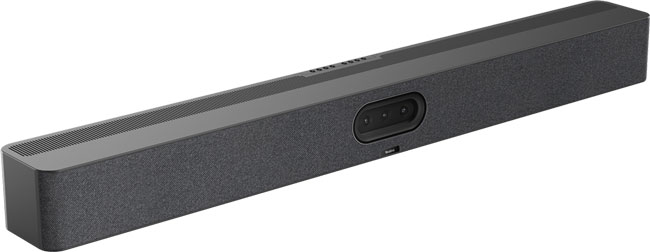
The Yealink MeetingBar series is a good example. (We’re referring here to horizontal field of view. In their material, Yealink refers to “tele” cameras; we’ve changed it to the more standard “telephoto.”)
- Yealink A25 is a triple-camera video bar for focus rooms. It has an ultra-wide camera with 151° FOV and two telephoto cameras with 84.4° FOV.
- Yealink A40 is a double-camera video bar for small to medium rooms. It has two telephoto cameras with 110° FOV.
- Yealink A50 is a triple-camera video bar for medium to large rooms. It has a wide camera with 98° FOV and two telephoto cameras with 41.6° FOV.
As you can see, the A50’s wide camera has a FOV narrower than the A40’s telephoto cameras. Its telephoto cameras have a FOV more than twice as narrow as the A25’s telephoto cameras.
Why did Yealink manufacture its large room video bar to have cameras, both wide-angle and telephoto, that are significantly narrower than the equivalent cameras in their video bars for smaller rooms?
Video call and virtual meeting participants in large rooms sit farther away from the camera than they do in smaller rooms.
By having a telephoto camera with a narrower field of view, a video bar’s camera can focus in on individual faces better. Instead of relying on digital zooming, which is essentially enhancing a cropped image, to pick out a face, it uses the lens’s natural optics. The result is lossless detail vs lossy detail — a big deal for professional-grade video.
The same principle applies to the wide-angle camera. Wide-angle video conferencing cameras are used for group coverage.
Because people sit farther away, the wide-angle lens needs to be narrower; otherwise, when framing the group, the camera would need to crop out a lot of the “wasted” space around the group. It’s the digital zoom vs natural optics issue again.
Video bar cameras might also have different depths of field: the range within which a picture will look sharp. Back to the MeetingBar Series:
- A25 has a depth of field range of 0.4 to 2.5 meters (1.3 to 8.2 feet)
- A40 has a depth of field range of 1 to 5 meters (3.3 to 16.4 feet)
- A50 has a depth of field range of 0.7 to 8 meters (2.3 to 26.3 feet)
On top of the camera itself, many video conferencing cameras, including video bars, support automatic features that improve the video call experience like automatic speaker tracking and group framing.
Video bars use a variety of methods to perform these actions; for example, it might use a beamforming microphone array to pinpoint the origin of a voice then focus the camera on the speaker.
It can be difficult to ascertain the exact range of a given feature.
Here’s a rule of thumb. If you want to use a feature beyond the distance of its microphone or camera range, it likely won’t work, and it likely won’t work well if it’s on the far-end of the range.
When looking for a video bar for a large conference room, make sure these features have sufficient range for the room size and group size.

Video Bar Microphones and Speakers for Large Rooms
The next two features — microphones and speakers — are better examined together, because they have similar concerns.
With microphones, the key concern is reach: how far away can someone sit while still having their voice picked up clearly?
One way manufacturers improve voice pickup range is simply to stick more microphones in the video bar. For example, Yealink A40 has an 8-microphone array with 6-meter (19.7-foot) range; Yealink A50 has a 16-microphone array with 10-meter (32.8-foot) range. More microphones, better voice pickup.
Professional video bars for large rooms feature audio clarification technologies tuned to the specific challenges of people sitting farther away. Logitech Rally Bar, for example, uses six digital MEMS microphones that form five adaptive acoustic broadside beams to pick up voices out to 23 feet, then clarifies the audio stream using an AI-based de-noising algorithm.
Usually voice pickup ranges are given as a maximum distance; the range within which voices sound good is often a good bit smaller.
That’s why expansion microphone support is a key feature of large rooms video bars. Rally Bar supports up to four Rally Mic Pods, each of which offers 360° voice pickup out to 15 feet.
Video bar speakers are similar.
The key concern here is that the speakers need to be powerful enough for everyone to hear. But if you’re blasting audio loudly enough that people in the back can hear the conversation, the volume might be too loud for the people in the front. Using expansion speakers lets you position them optimally so everyone can hear and not have their ears hurt.
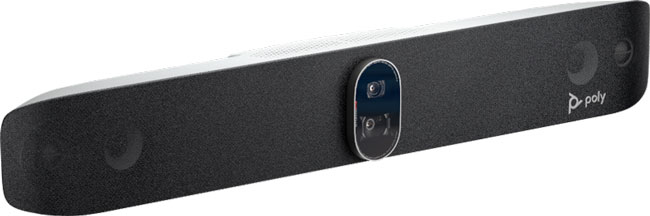
The HP Poly Studio X Series provides a great example of how large room video bars will support more microphones and speakers.
- HP Poly Studio X32 is a video bar for small rooms. It has 5 W stereo speakers. It has no connector for an audio peripheral.
- HP Poly Studio X52 is a video bar for medium rooms. It has 20 W stereo speakers. It has a connector for an expansion microphone, but not for an expansion speaker.
- HP Poly Studio X72 is a video bar for large rooms. It has two-way 20 W (30 W max.) stereo speakers, 15 W (20 W max.) aluminum cone tweeters, and tuned bass ports. It has one 3.5 mm audio in port for an analog microphone, one 3.5 mm audio out port for a secondary speaker, and one RJ11 port for an expansion microphone; it also supports connecting to an audio DSP (digital signal processor) using one of its USB-A ports.
(To be completely accurate, all HP Poly Studio X Series video bars support HP Poly Studio A2 expansion microphones. It’s complicated. You need to use an HP Poly Studio A2 Audio Bridge. Studio X32 and Studio X52 need a USB-A to Ethernet adapter to connect. Studio X32 supports two A2 Table Mics; Studio X52 and Studio X72 support four.)
You need to measure the room size and determine the average size of the call participant group before purchasing a video bar.
Do the camera’s listed specifications match your needs? Do you need expansion microphones? Is the large room smaller than you thought, so a medium room video bar would be more appropriate? Is a modular video conferencing system with separate cameras, microphones, and speakers a better choice?