

In last week’s blog, we explained when to use Microsoft Teams Rooms on Windows devices. In this week’s blog, we explain when to use Microsoft Teams Rooms on Android devices. If you want an in-depth discussion of the differences between the two, we cover that topic in detail in the previous blog. We occasionally use MTR to abbreviate Microsoft Teams Rooms.

In the world of business communication technology, there’s always push and pull between simple solutions that just work and customizable solutions that provide a more fine-grained fit.
Microsoft Teams Rooms is a video conferencing platform for everyone. But in being for everyone, it needs to fit the maximum number of video call and virtual meeting scenarios.
This, in turn, requires Microsoft to make available solutions that fit everyone’s needs.
To make their unified communications service accessible to businesses of all sorts, they offer Microsoft Teams Rooms Certified devices on both Windows and Android. While the Teams Rooms experience is mostly similar on the two operating systems, there are differences.
In this blog, we go through four reasons why Microsoft Teams Rooms on Android devices may be the right choice for you:
At the end, we touch on two key points you should consider when shopping for MTR on Android devices. We also recommend you check out our expert, detailed Microsoft Teams Rooms Video Conferencing Equipment Buyer’s Guide for more information.
Let’s get into it!

The Benefits of Microsoft Teams Rooms on Android Devices
Microsoft Teams Rooms on Android devices (mostly) come in one of three flavors:
- Video bar
- Interactive whiteboard
- Touch console
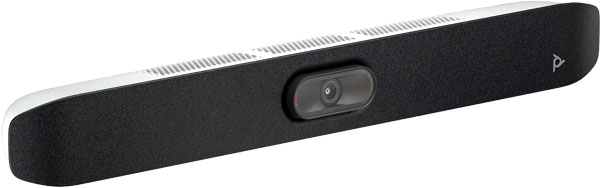
A video bar for Microsoft Teams combines a professional camera, microphone, and speaker in one device. Often, it can also run the Microsoft Teams Rooms app.
An interactive whiteboard for Microsoft Teams takes everything a video bar has and combines it with a large, professional-grade touchscreen display for collaboration and content editing.
A touch console for Microsoft Teams is a dedicated tablet for operating the video conferencing system.
These three devices cover many common video conferencing scenarios, plus they’re easy to integrate, use, and manage as part of your Microsoft Teams ecosystem.
Simplicity
In general, Microsoft Teams Rooms on Android devices are simpler to use than Windows devices.
Having a simpler solution provides two distinct benefits:
- It’s simpler to establish a professional video conferencing ecosystem
- It’s simpler to purchase and deploy video conferencing devices
Video bars are the simplest method to achieve a professional level of video conferencing and virtual meeting. They incorporate a camera, microphone, and speaker into one device; many are also codecs that run the meeting room software.
For a comprehensive introduction to video bars, check out our expert, detailed Video Bars Buyer’s Guide.
Video bars for Microsoft Teams are certified for MTR on Android devices. They give you a complete, platform-native experience without requiring complex system setup. You can also use video bars with MTR on Windows as peripherals to a PC, which is great but a more complex arrangement.
The same benefits apply to interactive whiteboards. You get a complete Microsoft Teams experience, including content sharing and editing, without the hassle of connecting the display to a PC.
The second benefit we listed above — a simpler procurement and deployment process — stems from the first benefit. If your video conferencing ecosystem is more streamlined, you have less to worry about when purchasing and using your equipment.
This is one of the reasons that Microsoft Teams Rooms on Android devices are excellent solutions for small businesses.
Small Business
Because MTR on Android devices are generally simpler than MTR on Windows devices, they are excellent solutions for small businesses and small organizations who want professional-level communications without the fuss.
Think about the typical small business. They don’t have in-house tech support staff like an enterprise, so they want easy to use and manage solutions. They want streamlined, cost-efficient solutions with top-tier performance, but they also don’t need every single new and shiny feature. They also don’t need video conferencing systems for large rooms.
Video bars fit the bill perfectly. Small business video bars for Microsoft Teams are simple to use with Teams Rooms. Because they have passed the Microsoft Teams Rooms on Android certification process, you get guaranteed elite performance, first-class communications security, and effortless platform integration. In fact, you get the exact same performance and security that the biggest multi-nationals would get.
And if your small business subscribes to the Microsoft 365 ecosystem — Word, Excel, PowerPoint, Outlook, etc. — Microsoft Teams Rooms is an excellent choice for video conferencing, workplace chat, and even phone calls. It integrates seamlessly with the other applications, giving your small business a simple, complete solution.
A Quick Plug: If you’re a small business and would like friendly, expert help with your Microsoft Teams video conferencing system, please get in touch! We’ve been trained in and helping customers with Microsoft video conferencing equipment since the days of Microsoft Lync and Skype for Business. Our highly experienced remote tech support is here for you.
Cost-Effective
We mentioned in the last section how small businesses desire cost-efficient solutions. Let’s expand on this point a bit.
Video bars are cost-effective solutions for Microsoft Teams Rooms on Android video conferencing. There are video bars for room sizes from huddle rooms to large rooms, including models with multiple integrated cameras.
Because they’re unified solutions — camera, microphone, speaker, and (often) codec in one — they’re almost always less expensive than buying individual devices as part of modular, PC-based Microsoft Teams Rooms on Windows systems.
And because there are options for Microsoft Teams video bars for huddle rooms to large rooms, your business has purchasing choice. You can find a unified solution for a wide range of video conferencing scenarios.
This makes them cost-effective solutions for professional Microsoft Teams Rooms video conferencing.
There are a couple places, however, where MTR on Windows solutions shine. Modular systems, by their nature, are more expandable than unified devices. In many large to extra-large conference rooms, using multiple external cameras is more effective than using a video bar, even a multi-camera video bar. Some video bars do support expansion microphones, but they’re generally not expandable beyond that.
There’s another drawback to video bars being a unified solution. When it comes time to upgrade, you need to replace the whole video bar. With MTR on Windows systems, which are PC-based and modular, you can (most of the time) replace individual devices as needed, rather than replacing everything at once. If the PC that you run the application on needs to be upgraded, you can swap it for a newer one without buying new cameras and so on.
Interactive Whiteboards
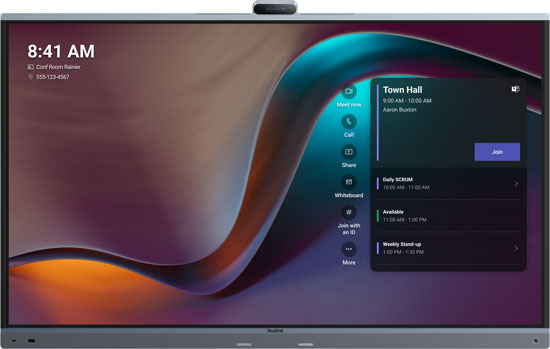
Picture a touchscreen display with a built-in video bar: camera, microphone, speaker, codec, and TV all combined into one meeting room device. That’s an interactive whiteboard. (You might also find called a touchboard, smart whiteboard, touchscreen display, collaboration display, or another similar name.)
Interactive whiteboards for Microsoft Teams are MTR on Android devices. Generally, they accept finger and stylus multi-touch input, making them simple to use. You should also be able to connect a separate touch console, which makes using them as video conferencing displays easier.
Teams touchboards make collaboration easier.
Ideate as a group by using the display as a digital whiteboard in a Teams meeting. Because it’s digital, saving a brainstorming session is as simple as saving a picture.
Edit content together. For example, you could have the development team show their latest product idea and have the group be able to give feedback directly on the product images.
The use-cases are numerous. If an interactive whiteboard for Microsoft Teams sounds like the workplace collaboration solution you and your team, Microsoft Teams Rooms on Android is your go-to platform.
If you want to use one with Windows, some interactive whiteboards like the Yealink MeetingBoards have optional modules that enable MTR on Windows. These modules are, essentially, miniature Windows PCs that slot into a display, changing it from an Android device to a Windows one.
MDEP
We just wanted to touch briefly on one other benefit of MTR on Android devices: the Microsoft Device Ecosystem Platform or MDEP.
This platform reduces Android fragmentation to deliver better security, more timely OS updates, and more. It helps manufacturers build better and more innovative products while ensuring customers can trust devices will be secure, natively integrate with Teams, and deliver first-class performance. Some newer MTR on Android devices like Yealink MeetingBar A50 are built on MDEP, and more are sure to come.
Considerations
Before purchasing any Microsoft Teams Rooms on Android device, you should answer these two questions:
- Are the features you want to use supported by Microsoft Teams Rooms on Android? There isn’t one-to-one feature parity between the two versions. In general, the Windows version makes more features available than the Android version, although there are some features that are supported on Android and not on Windows. We strongly recommend you check Teams Device feature comparison (external link) on the Microsoft Teams Learn site before purchase.
- When does the device’s certification period end? Microsoft Teams Rooms on Android devices are only certified for the specific version of Android that was tested. For example, a video bar might be certified for Android 13. It can be recertified for a later version of Android, but the manufacturer must go through the certification process all over again for the newer OS version. The result is that MTR on Android devices have, in general, more limited certification periods than their Windows counterparts. We strongly recommend you check Teams Rooms on Android certified devices (external link) on the Microsoft Teams Learn site before purchase.
For a deeper discussion on the differences between the two platforms, see our last blog on Microsoft Teams Rooms on Windows devices (linked at the beginning of this blog).